

Description
Download LMG Media Toolkit – LED calculator, widescreen calculator, projection blending, LED tile dimensions, power consumption calculator, multimedia tool, Android app
Overview
The LMG Media Toolkit is a specialized Android application designed for professionals working in the multimedia and display technology sectors. Developed by LMG, the tool serves as a practical utility for individuals involved in the planning, installation, and configuration of LED tile displays and widescreen projection systems. Its primary purpose is to simplify complex calculations related to physical dimensions, weight, power consumption, and projection blending, which are essential for achieving seamless visual outcomes in commercial and professional environments.
Target users include display installers, AV technicians, event coordinators, and multimedia designers who require accurate, on-the-go calculations during site assessments or project planning. The software addresses common challenges such as determining optimal LED tile arrangements, estimating power needs, and calculating overlap zones for multi-projector setups. By consolidating these functions into a single mobile application, LMG Media Toolkit reduces reliance on manual calculations and external tools, improving workflow efficiency.
Real-world usage scenarios include on-site evaluations of LED display installations, pre-event setup planning for large-scale presentations, and collaborative design sessions where precise technical data is required. The application’s focus on practicality and precision makes it a valuable asset in fast-paced, technical environments where accuracy and speed are critical.
Key Features & Capabilities
- LED Calculator: Enables users to compute dimensions, weight, and power consumption for LMG’s LED tile products. This feature supports accurate planning for display layouts and electrical load assessments.
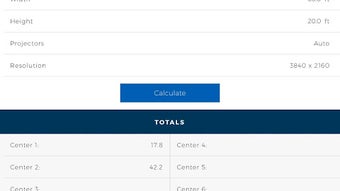
- Widescreen Calculator: Assists in determining blend areas between multiple projectors for seamless widescreen projection. It helps users avoid visual artifacts and ensures smooth transitions across display surfaces.
- On-the-Go Accessibility: As a mobile application, the toolkit can be used in field environments without the need for desktop systems or complex software.
- Integration with Design Workflows: Provides real-time data that can be shared with team members or used directly in design documentation and client presentations.
- Simple, Focused Interface: Designed with a minimal user interface to prioritize speed and accuracy, avoiding unnecessary distractions.
These capabilities are particularly beneficial during the pre-installation phase of LED display projects, where incorrect measurements can lead to costly rework. The LED calculator allows users to quickly estimate the number of tiles needed based on screen size and spacing, while the Widescreen Calculator helps determine the ideal overlap zone to prevent visible seams in multi-projector setups. This level of precision supports both efficiency and professionalism in technical installations.
User Interface, Workflow & Performance
The LMG Media Toolkit features a clean and intuitive interface optimized for mobile use. Navigation is straightforward, with clearly labeled sections for the LED calculator and the Widescreen Calculator. Users can switch between tools with minimal taps, ensuring rapid access to required functions during time-sensitive tasks.
Workflow efficiency is enhanced by the application’s direct input approach—users enter basic parameters such as screen width, height, or projector distance, and the app delivers immediate results. The design avoids clutter, focusing on essential inputs and outputs, which reduces the likelihood of user error and speeds up decision-making.
Performance details were not specified by the developer. However, given the app’s lightweight nature and the absence of complex processing demands, it is expected to run smoothly on most modern Android devices. The application size of 2.3 MB suggests minimal storage impact and fast installation. The developer did not provide additional system requirements or performance benchmarks.
Compatibility & System Requirements
The LMG Media Toolkit is designed for Android devices and is compatible with Android 5.0 and later versions. It is available for download on the Google Play Store, ensuring access to a wide range of mobile users. The application has a file size of 2.3 MB, indicating a lightweight footprint that does not strain device storage.
Exact system requirements were not listed. Compatibility with specific hardware, such as processor type or RAM, is not specified. The developer did not provide information on supported screen resolutions or device types beyond the general Android platform. Users are advised to ensure their device meets the minimum Android version requirement to run the application successfully.
Pros and Cons
Pros
- Specialized tools tailored for LED and projection professionals
- Free to download and use, with no in-app purchases
- Lightweight application with minimal storage usage
- Intuitive mobile interface for on-site use
- Provides accurate calculations for installation planning
Cons
- Limited to Android platform; no support for iOS or desktop
- No offline functionality mentioned
- Functionality restricted to LMG’s product line
- Missing detailed technical specifications or user guides
- Version 1.0 suggests limited feature set and potential for future updates
FAQ Section
Is LMG Media Toolkit available for iOS devices?
The application is currently available only for Android devices. There is no information indicating support for iOS platforms.
Is the app safe to download?
As the app is distributed through the Google Play Store, it undergoes standard security checks. Users are advised to download only from official sources to ensure safety.
Does the app require an internet connection?
The developer did not specify whether the app requires an internet connection. It may function offline, but this has not been confirmed.
Can I use this tool for non-LMG LED products?
The LED calculator is designed specifically for LMG’s LED tile products. While general principles may apply, the accuracy for other brands cannot be guaranteed.
How often is the app updated?
As of the current release date, no update history is available. The version is listed as 1.0, suggesting it may be in an early release stage.
Final Thoughts
The LMG Media Toolkit delivers a focused, practical solution for professionals working with LED displays and widescreen projection systems. Its dual functionality—offering both an LED calculator and a Widescreen Calculator—addresses two critical aspects of display setup with precision and ease. The app’s mobile format makes it ideal for field use, allowing technicians and designers to perform essential calculations on-site without relying on desktop software.
While the tool is limited in scope and platform availability, its niche focus and free access make it a compelling choice for users within LMG’s ecosystem. The lightweight design and straightforward interface enhance usability, ensuring that even users with minimal technical experience can benefit from its core features.
For AV professionals, event planners, and display installers, the LMG Media Toolkit represents a valuable addition to their digital toolkit. It streamlines complex calculations and supports accurate project planning, contributing to smoother installations and higher-quality visual outcomes.
Download LMG Media Toolkit now
Guides & Tutorials for LMG Media Toolkit APK
How to install LMG Media Toolkit APK
- Click the Preview / Download button above.
- Once redirected, accept the terms and click Install.
- Wait for the LMG Media Toolkit APK download to finish on your device.
How to use LMG Media Toolkit APK
This software is primarily used for its core features described above. Open the app after installation to explore its capabilities.
User Reviews for LMG Media Toolkit APK 0
No reviews found





